
eAssist Data Breach & Ransomware Investigation: October 2026 Update for Dental Practices

What is known, what remains unverified, and how dental practices can review outside billing access without disrupting patient care or claims processing.
Updated October 14, 2026.
In this guide
- Latest eAssist security incident update
- Incident timeline: September–October 2026
- What is confirmed, reported, and unknown?
- Why outsourced dental billing creates a distinct cybersecurity risk
- First 24–72 hours: practical response plan
- Ten questions to send your billing provider
- Legend Networking's ten-control vendor access review
- Additional considerations for DSOs and multi-location groups
- What do the federal lawsuits establish?
- HIPAA responsibilities when a billing vendor investigates an incident
- Should a dental practice change billing providers?
- What dental practices should not do
- The bigger lesson: vendor access is part of your security perimeter
- Sources and editorial transparency
- Frequently asked questions
- The bottom line
Latest eAssist security incident update
The cybersecurity investigation involving eAssist Dental Solutions has raised questions about outsourced billing security, third-party credentials, and possible exposure of sensitive information. On September 8, 2026, eAssist notified customers that it was investigating a potential information security incident with outside cybersecurity professionals. This followed a September 6 ransomware-group claim naming eAssist.
A notice addressed to former eAssist customers and publicly reproduced in late September warned that potentially involved information may have included usernames and passwords used by eAssist personnel to access customer systems. On October 12, Medix Dental IT reported receiving later customer communications acknowledging that data had been exfiltrated from an eAssist system.
Important evidence distinction: Legend Networking has not independently authenticated those later communications described by Medix. That reporting does not establish that every eAssist customer was affected, that a particular practice's credentials were acquired, or that patient protected health information (PHI) was stolen.
Dental practice owners should distinguish three questions: Did unauthorized activity occur at the vendor? Was their practice's information or access affected? And do the facts create legal notification duties? Each requires different evidence.
Incident timeline: September–October 2026
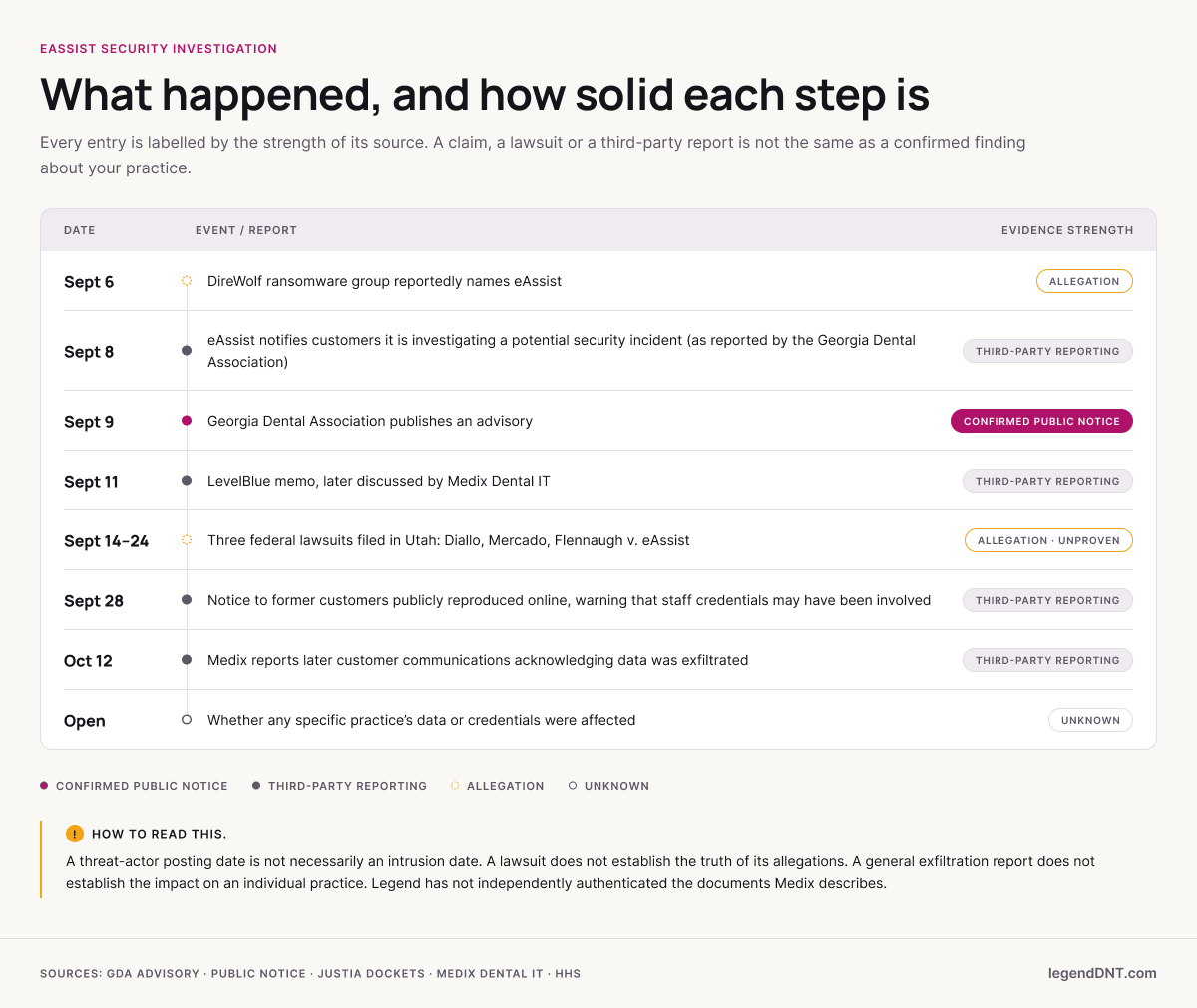
| Date | Development | Evidence status |
|---|---|---|
| Sept. 6 | DireWolf reportedly names eAssist | Threat-actor claim, not independent proof |
| Sept. 8 | eAssist notifies customers of an investigation | Customer notice reported by Georgia Dental Association |
| Sept. 9 | Georgia Dental Association publishes advisory | Public advisory |
| Sept. 11 | LevelBlue memo later discussed by Medix | Underlying memo not independently reviewed |
| Sept. 14 | Diallo v. eAssist, 2:26-cv-00854, filed in Utah | Public docket; allegations unproven |
| Sept. 16 | Mercado v. eAssist, 2:26-cv-00859, filed in Utah | Public docket; allegations unproven |
| Sept. 24 | Flennaugh v. eAssist, 2:26-cv-00887, filed in Utah | Public docket; allegations unproven |
| Sept. 25 | "Consolidate Cases" entry appears in Diallo | Public docket index; outcome not shown |
| Sept. 28 | Former-customer notice publicly reproduced | Reproduced notice, not a practice-specific finding |
| Oct. 9–13 | Court extends eAssist's time to answer in Diallo and Mercado | Public docket index; no answer filed yet |
| Oct. 12 | Medix reports later communications acknowledging exfiltration | Third-party reporting; primary documents not authenticated |
| Oct. 14 | Legend publishes updated security guidance | This article |
A threat-actor posting date is not necessarily an intrusion date. A lawsuit filing does not establish the truth of its allegations. A general exfiltration report does not establish the impact on an individual practice.
What is confirmed, reported, and unknown?
| Question | Current assessment |
|---|---|
| Did eAssist notify customers about an investigation? | Yes, as documented in September reporting. |
| Did a ransomware group make a claim? | Yes; allegation only. |
| Were former customers warned about possible credentials? | A publicly reproduced notice warned of potentially involved credentials. |
| Did eAssist acknowledge exfiltration? | Medix says later communications did; Legend has not authenticated them. |
| Was a specific practice's PHI acquired? | Not established by sources reviewed. |
| Must every customer notify patients? | Cannot be determined without a practice-specific assessment. |
Why outsourced dental billing creates a distinct cybersecurity risk
eAssist provides outsourced dental insurance billing, and Henry Schein announced in June 2021 that it had acquired a 70% majority interest in the company. A billing provider may have legitimate access to practice management software such as Dentrix, Open Dental, or Eaglesoft; insurance payer portals; clearinghouses; claims-processing tools; remote desktop sessions; and other practice resources. The relevant security questions are which systems an account can reach, what permissions it holds, how activity is monitored, and how access can be revoked.
Illustrative access path, not an account of the eAssist incident: External billing consultant → approved authentication or remote connection → authorized PMS, payer portal, claims and receivables information, and other permitted practice systems.
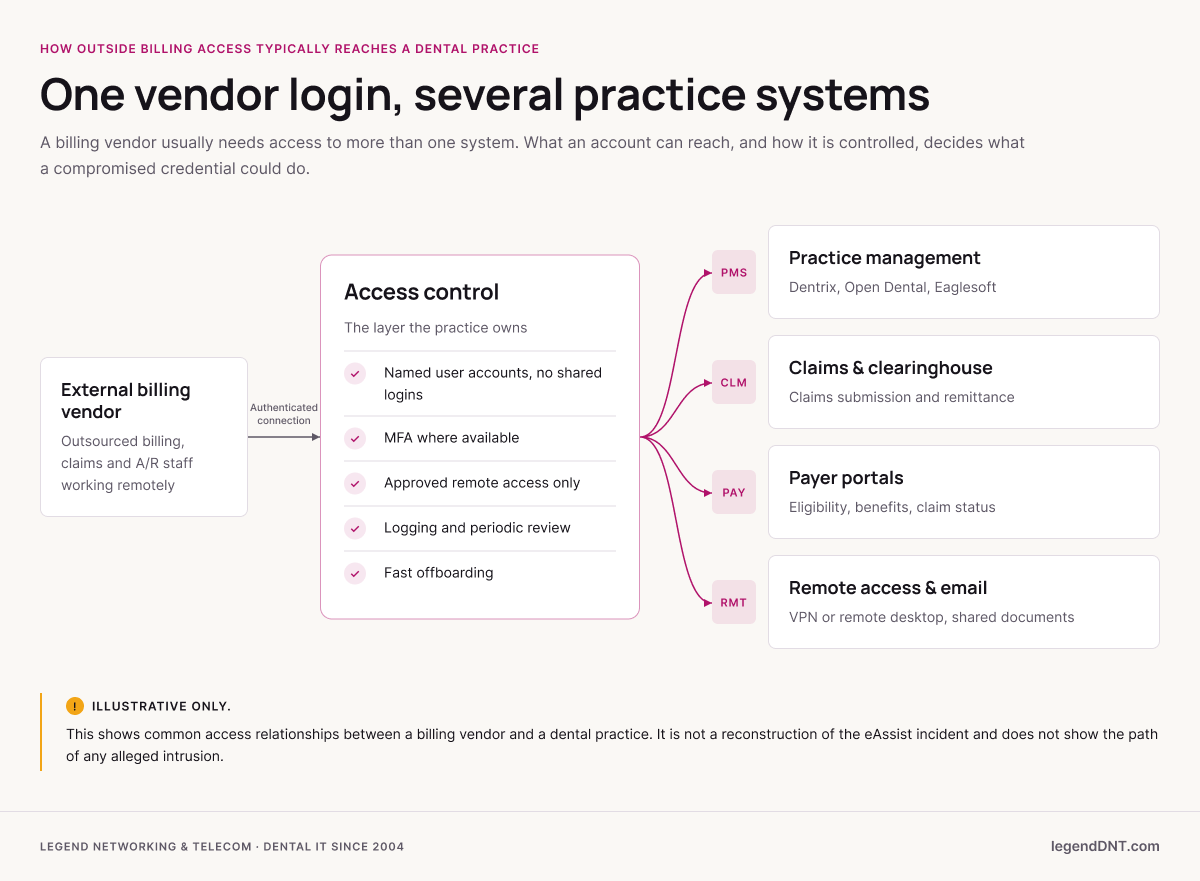
If a vendor credential is compromised, an attacker might be able to act within that account's existing permissions. Actual exposure depends on MFA, network restrictions, application privileges, session controls, and audit logging. Keeping those pathways visible and controlled is the everyday work of managed dental cybersecurity services, and the user lists inside your PMS are part of the same picture (see practice management software and imaging IT support).
First 24–72 hours: practical response plan
First 24 hours: identify and preserve
Identify current and former eAssist-related accounts, shared credentials, privileged accounts, payer portal access, VPN connections, and remote-support tools. Preserve notices and relevant logs. If suspicious activity is found, coordinate with qualified incident responders before making changes that could destroy evidence. Disable unnecessary access or rotate credentials in a controlled manner so billing can continue. The dental ransomware recovery playbook covers evidence preservation in more detail.
Within 48 hours: assess access and monitoring
Review available authentication, endpoint, VPN, remote-support, and application logs. Look for unfamiliar devices, unusual access times, privilege changes, unexpected sessions, and password reuse. Verify MFA wherever supported, including Microsoft 365 and practice email, and evaluate compensating controls for legacy applications.
Within 72 hours: document and plan
Document systems reviewed, changes made, remaining risks, and named owners. Request written practice-specific findings from eAssist. Review your business associate agreement (BAA) with legal and compliance advisers. Verify protected backups and restoration procedures; dental backup and disaster recovery keeps the practice able to restore its own systems if a third party is compromised, although backups cannot undo data that has already been taken.
These are suggested operational priorities, not legal notification deadlines. Tailor the response to actual findings.
Where to look for vendor accounts in your own systems
Vendor access usually shows up in four places. Check each one with whoever administers it, and write down what you find before you change anything:
- Practice management software. Review the user list and security roles in Dentrix, Open Dental or Eaglesoft for billing-company users, generic logins and accounts nobody recognizes. The Dentrix IT support, Open Dental IT support and Eaglesoft IT support pages describe how each system is set up and supported.
- Payer portals and clearinghouse accounts. List every login a billing vendor uses or used, and note which ones are shared.
- Remote access. Remote-support tools, VPN accounts and remote desktop connections installed for billing work, including ones left behind after the work ended.
- Saved and shared passwords. Credentials stored in browsers or spreadsheets on billing workstations. Password management for dental offices covers moving them into a managed store.
Ten questions to send your billing provider
- Which named individuals and service accounts have access to our systems?
- Are unique user accounts used, or are credentials shared?
- Is MFA enabled, and where are compensating controls needed?
- Which systems and practice locations can each account access?
- Are authentication events and administrative actions logged?
- How are passwords, API keys, and remote-access tokens stored and rotated?
- How quickly are accounts disabled when personnel leave?
- How is vendor access removed when our contract ends?
- What incident notification and escalation procedures apply?
- Can you provide practice-specific findings and evidence of remediation?
Legend Networking's ten-control vendor access review
| Security control | Evidence to request |
|---|---|
| Vendor inventory | All external organizations with system access documented |
| Named identities | Unique identifiable accounts; no unnecessary shared logins |
| Authentication | MFA or documented compensating controls |
| Least privilege | Permissions appropriate to roles and locations |
| Remote access | Approved, secured connections and session restrictions |
| Monitoring | Relevant logs collected, retained, and reviewed |
| Credential security | Secure storage, rotation, token/API-key review |
| Offboarding | Prompt revocation of accounts and active sessions |
| Incident escalation | Named contacts and documented response procedures |
| Recovery readiness | Tested backup restoration and recovery responsibilities |
A practice may assign up to 10 points per control for an internal 100-point worksheet. As a rough guide, 90 to 100 points suggests the basics are documented and working, 70 to 89 points suggests improvements are worth scheduling, and below 70 points suggests a vendor access review is due. This is an educational prioritization aid, not a validated maturity model or a compliance determination. A serious gap requires attention regardless of total score. For a wider view of the practice beyond vendors, see the dental cybersecurity risk assessment checklist.
Additional considerations for DSOs and multi-location groups
DSOs should determine whether vendor credentials or remote-access arrangements span multiple practices. Maintain a central inventory, use location-specific permissions where possible, standardize MFA and offboarding, document approval responsibility, and correlate security events across locations. An issue affecting one office should trigger review of shared access elsewhere.
A central vendor register works best when each row records the vendor, the service, the locations served, the systems and data involved, the access method, the named users, MFA status, the BAA, the internal owner and the termination procedure. More on running IT across locations is in dental IT support for DSOs and multi-location groups.
What do the federal lawsuits establish?
Public docket summaries identify three September 2026 civil cases filed against eAssist in the U.S. District Court for the District of Utah: Diallo v. eAssist (2:26-cv-00854), Mercado v. eAssist (2:26-cv-00859), and Flennaugh v. eAssist (2:26-cv-00887). These filings do not establish liability, verify alleged data exposure, or determine a practice's obligations.
On the public docket index, an entry titled "Consolidate Cases" appears in Diallo on September 25 (the index does not show whether consolidation has been ordered), and in October the court extended eAssist's time to answer in Diallo and Mercado. No answer from eAssist appears on those dockets as of October 14, and the docket entries do not describe the allegations themselves.
HIPAA responsibilities when a billing vendor investigates an incident
The HIPAA Breach Notification Rule imposes duties when a breach of unsecured PHI occurs. Business associates generally must notify affected covered entities without unreasonable delay and no later than 60 calendar days after discovery of a reportable breach (45 CFR 164.410), subject to applicable exceptions. Covered entities have their own notification duties. State laws and contracts may impose additional requirements.
A cybersecurity investigation or ransomware allegation does not automatically establish that a reportable breach occurred. Practices should document a fact-specific assessment with qualified legal and compliance advisers and preserve supporting communications and technical evidence. HIPAA compliance support for dental practices and the HIPAA Security Rule updates for dental practices cover the safeguards side.
If your practice carries cyber insurance, read the policy's notice section now: many policies set their own requirements for reporting a suspected incident, separate from HIPAA. The controls insurers commonly ask practices to document are covered in dental cyber insurance requirements.
Should a dental practice change billing providers?
Not automatically. Consider verified practice-specific findings, the vendor's current security controls, the quality of its written communications, contract terms, operational dependencies, and contingency options. If changing providers, carefully coordinate claims, accounts receivable, payer credentials, patient-related information, and account removal to avoid creating additional operational or security problems.
What dental practices should not do
- Do not assume your practice was affected, or that it was not.
- Do not assume PHI was stolen.
- Do not repeat threat-actor allegations as verified facts.
- Do not change every password at once without mapping what billing depends on first.
- Do not ignore vendor security simply because the practice-specific impact is still unknown.
The bigger lesson: vendor access is part of your security perimeter
Billing companies, PMS consultants, imaging vendors, cloud providers, and IT contractors may all have legitimate access to critical dental systems. Every practice should know who has access, why it is needed, how it is secured, what is logged, and how it is removed. Dental cybersecurity does not stop at the office firewall.
Sources and editorial transparency
- Georgia Dental Association advisory: https://www.gadental.org/news/eassist-ransomeware-092026
- Publicly reproduced former-customer notice: https://blog.denticle.com/2026/09/from-eassist-important-security-notice.html
- Medix Dental IT (secondary reporting): https://medixdental.com/eassist-data-breach/
- Diallo docket: https://dockets.justia.com/docket/utah/utdce/2%3A2026cv00854/166998
- Mercado docket: https://dockets.justia.com/docket/utah/utdce/2%3A2026cv00859/167096
- Flennaugh docket: https://dockets.justia.com/docket/utah/utdce/2%3A2026cv00887/167228
- HHS HIPAA Breach Notification Rule: https://www.hhs.gov/hipaa/for-professionals/breach-notification/index.html
- 45 CFR 164.410 (notification by a business associate): https://www.law.cornell.edu/cfr/text/45/164.410
- Henry Schein press release, June 10, 2021: https://investor.henryschein.com/news-releases/news-release-details/henry-schein-acquires-majority-interest-eassist-dental-solutions
Editorial disclosure: This article attributes the later communications and the LevelBlue memorandum to Medix's reporting, not to source documents Legend has independently authenticated. It does not determine whether any particular practice's PHI was compromised. It is cybersecurity education and general information, not legal advice.
Frequently asked questions
Has eAssist confirmed information was stolen?
Medix reported receiving later customer communications acknowledging exfiltration from an eAssist system. Legend has not independently authenticated those communications; the impact on any particular practice remains unestablished by the evidence reviewed.
Does this mean my dental practice was breached?
No practice-specific conclusion can be drawn from general reporting. Request written findings and review your own access and security records.
Should former eAssist customers rotate passwords?
Review and rotate credentials previously assigned to or shared with eAssist, particularly active privileged accounts and reused passwords. Review sessions, API keys, and tokens where applicable.
Does this automatically trigger patient notification?
No. A notification determination depends on the facts and applicable law. Seek qualified legal and compliance advice.
Can endpoint protection prove that no data was taken?
No. Endpoint security and containment reports may provide important evidence, but their existence alone cannot rule out earlier unauthorized access or acquisition.
What if we discover suspicious activity?
Preserve evidence, follow your incident-response plan, involve qualified responders, and coordinate with legal, compliance, and insurance contacts as appropriate.
How do we find eAssist accounts in Dentrix, Open Dental or Eaglesoft?
Ask whoever administers your practice management software to export the user list and security roles, then mark every account used by the billing company, every generic login, and every user nobody on staff recognizes. Do the same for payer portals and remote-access tools, and record what you find before disabling anything.
Does a business associate agreement mean a billing vendor is secure?
No. A BAA sets contractual obligations for handling PHI, including how the vendor must report incidents, but it does not replace MFA, named accounts, least-privilege access, monitoring, tested backups or an incident-response plan. Keep the BAA, the vendor's security contact and your own access records together.
Should we tell our cyber insurance carrier?
Read your policy's notice and reporting section with your broker or legal adviser. Many cyber policies have their own requirements for reporting a suspected incident, and those can apply even when a breach has not been confirmed. Keep copies of every vendor notice and your own review notes.
Who owns eAssist Dental Solutions?
eAssist Dental Solutions is an outsourced dental insurance billing company. Henry Schein announced in June 2021 that it had acquired a 70% majority interest in eAssist. As of October 14, 2026, Legend has not found a public statement from Henry Schein about the eAssist investigation.
The bottom line
Legend Networking & Telecom has supported dental practices since 2004 and has served over 3,500 practices. The site's pages on dental cybersecurity services, backup and disaster recovery and DSO and multi-location IT support describe the services in full.
A vendor-access review can help identify unnecessary accounts, insecure remote-access methods, overprivileged users, and opportunities to strengthen monitoring and recovery. Ask for a Free Dental IT Assessment and bring your vendor list, or book a consultation call.